
LaTeX import and export are important parts of a modern scholarly publishing workflow. Mathematical equations are essential in many scholarly articles. Researchers in mathematics, engineering, physics, computer science, economics, and other disciplines often use LaTeX because it provides a precise and reliable way to write complex formulas.
However, preparing LaTeX content for journal publishing can become complicated when the final article must also be available in JATS XML, HTML, PDF, or other publishing formats. This is where JATS Editor provides a more structured and practical solution.
JATS Editor allows editorial teams to add mathematical equations using LaTeX syntax while organizing the article into structured JATS content. The platform is designed to help publishers manage article metadata, references, citations, equations, and publication outputs in one connected workflow.
Why LaTeX Is Important in Scholarly Publishing
LaTeX is widely used because it can accurately represent mathematical symbols, formulas, subscripts, superscripts, fractions, matrices, and scientific operators.
For example, a simple formula can be written as:
E = mc^2More advanced expressions can use standard LaTeX commands:
\frac{a+b}{c}for fractions\sum_{i=1}^{n} x_ifor summation\int_{0}^{\infty} f(x)\,dxfor integrals
Using LaTeX helps maintain consistency between the author’s original manuscript and the final published equation. It also reduces the risk of formatting errors that may occur when formulas are manually recreated using ordinary text editors.
How LaTeX Works in JATS Editor
JATS Editor supports the addition of mathematical equations through the editor’s visual interface. Users can open the Insert tab and select the LaTeX or TeX Math Equation feature.
The equation can then be entered using LaTeX syntax and reviewed through the preview panel before it is inserted into the document. This allows users to check the visual result without needing to manually write XML tags.
JATS Editor supports two primary equation types.
Inline Equation
An inline equation is placed within a sentence or paragraph. It is suitable for short formulas, variables, and mathematical symbols that are part of the surrounding text.
For example:
O(x) = F(x) + C_{R_+^n}(x)An inline equation is useful when the formula does not require a separate number, caption, or cross-reference.
Inline equations can also be written using dollar-sign notation when supported by the workflow:
$A = \pi r^2$The expression is then converted into a formatted mathematical equation when the cursor moves away from the formula.
Equation Block
An equation block is displayed on its own line and is intended for longer or more important formulas.
Equation blocks are useful when an article needs:
- A separate equation number or tag
- A cross-reference from another paragraph
- A clearly separated mathematical expression
- Consistent placement in the article structure
- Easier navigation through the equation panel
For example:
x \geq 0,\quad F(x) \geq 0,\quad \text{and}\quad x^T F(x)=0After insertion, the equation block can be assigned a number such as “1”. It can then be referenced from another part of the article, helping readers locate the correct formula quickly.
LaTeX Import: Preparing Source Files Correctly
JATS Editor is also designed to help teams bring existing LaTeX projects into the editorial workspace. When LaTeX import is available in workflow, you can import a document that has already been prepared in LaTeX instead of recreating the manuscript from the beginning.
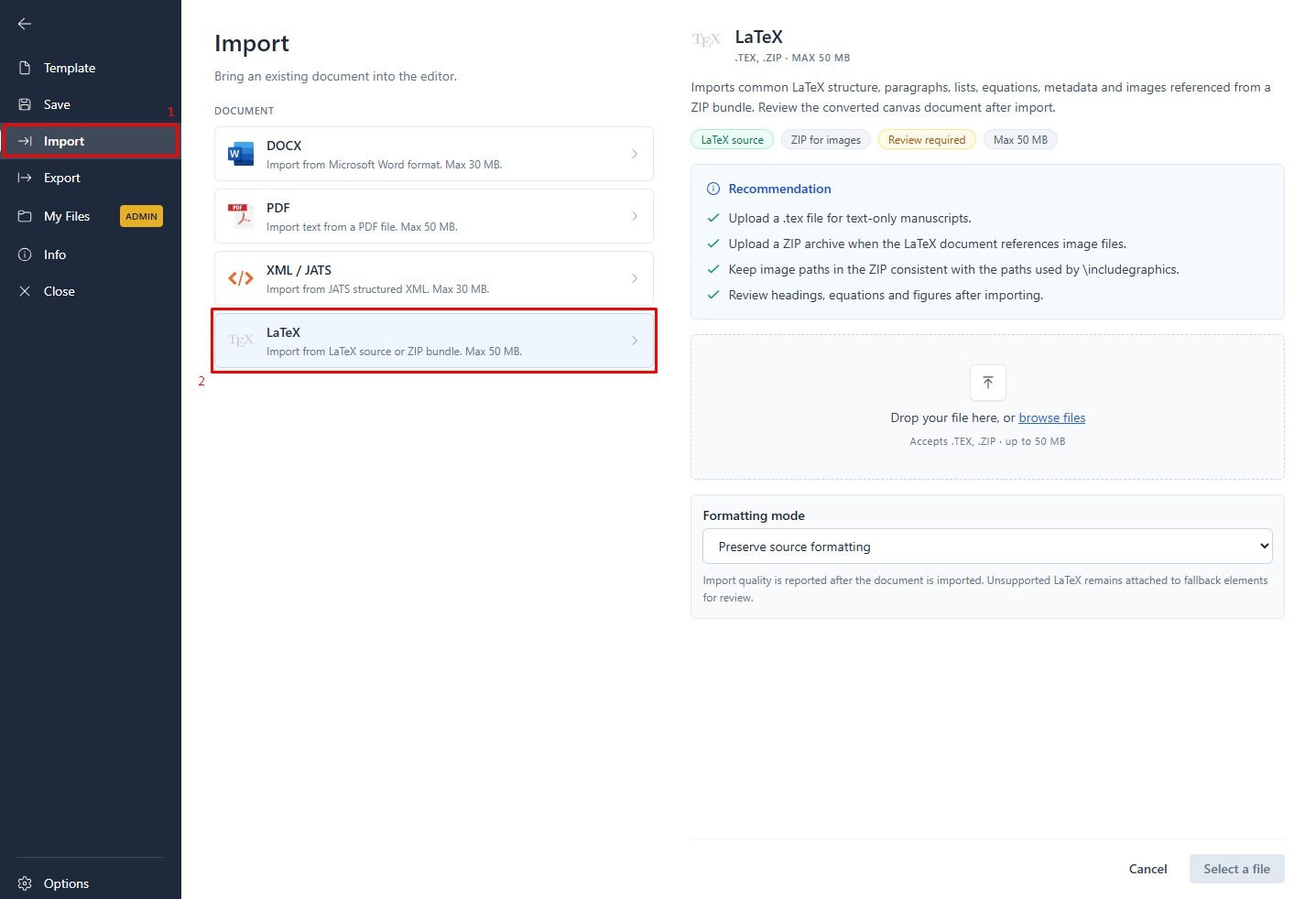
If the project contains several related files, such as a main .tex file, bibliography files, figures, or supporting assets, the files can be packaged into a ZIP file and imported as one project. This is especially useful for complete manuscripts that cannot be managed effectively as a single text file. After import, the content and equations should be reviewed in the editor so the article structure, metadata, references, and equation roles are ready for the next publishing stage.
For the most reliable result, use:
- Standard commands such as
\frac,\sqrt,\sum, and\int - Clear grouping with curly brackets
- Consistent use of subscripts and superscripts
- Simple mathematical notation
- Properly separated equations
- Minimal dependency on custom macros or unusual packages
For example:
\alpha_i = \frac{x_i}{\sum_{j=1}^{n} x_j}Complex custom commands may not always be interpreted consistently across different publishing systems. Therefore, equations should be reviewed after import and checked using the editor’s preview and validation features.
LaTeX import should also be understood as a structured content workflow. The goal is not only to preserve the visual appearance of an equation, but also to ensure that the equation can be connected to the article’s structure and publishing requirements.
LaTeX Export to JATS XML
When a document is exported from JATS Editor, the LaTeX equation is stored within the appropriate JATS XML structure.
An inline equation may be represented using an <inline-formula> element, while a displayed equation may use a <disp-formula> element. The LaTeX source is stored inside a <tex-math> element.
<inline-formula>
  <tex-math><![CDATA[E = mc^2]]></tex-math>
</inline-formula>
For a displayed equation, the XML may include an identifier and label so that the formula can be cross-referenced within the article.
JATS Editor can preserve LaTeX equation source inside structured JATS XML, and the edited article can also be exported in LaTeX format when that export option is enabled. This gives authors and editorial teams the flexibility to continue working with a .tex-based workflow after making structural or content revisions in JATS Editor. The exported LaTeX file should still be reviewed in the intended LaTeX environment, particularly when the manuscript uses custom macros, external packages, bibliography files, or image assets.
According to the official JATS Editor documentation, the platform creates complete LaTeX content inside the exported <tex-math> element for compatibility with JATS validation and scholarly publishing workflows. Read How to Add Mathematical Equation in JATS Editor for the detailed workflow.
One Workflow for Equations, JATS XML, and Publishing Outputs
Managing equations separately from the rest of an article can create unnecessary work. Editorial teams may need to use one application for LaTeX, another tool for XML tagging, and another system for PDF production.
JATS Editor brings these activities closer together in one editorial workspace. Users can manage:
- Article structure and headings
- Authors and affiliations
- References and citations
- Inline and displayed equations
- JATS tagging and validation
- XML export for journal publishing
- PDF-oriented publication workflows
The platform also supports different export requirements. For example, equations may be converted into images for EBSCO workflows because EBSCO does not currently support LaTeX in the same way as other publishing outputs. See How to Export JATS XML in JATS Editor for more information.
This flexibility helps journals prepare content according to the technical requirements of their target platform.
Why JATS Editor Is More Than a LaTeX Converter
JATS Editor is not simply a tool for converting formulas. It is designed as a structured authoring environment for modern scholarly publishing.
By combining LaTeX equation entry, JATS XML creation, metadata management, citation handling, validation, and publication output, JATS Editor helps editorial teams reduce repetitive manual work and improve consistency across the publishing process.
The result is a more reliable workflow in which mathematical content remains editable, structured, reviewable, and connected to the article’s XML structure.
Try a More Structured LaTeX Publishing Workflow
If your journal frequently handles mathematical equations, LaTeX manuscripts, or JATS XML production, JATS Editor can help simplify the editorial process.
Some LaTeX and publishing features may depend on the current product version or account configuration. To explore the available workflow and request access to selected features, contact the JATS Editor team today.
Turn complex equations into structured, publication-ready content with JATS Editor.