
JATS XML is the universal language for scientific journal managers to interact with international indexing systems, such as PubMed, Scopus, EBSCO, and DOAJ. Indexing systems read the XML structure, not HTML or PDF.
If the XML structure does not adhere to the correct standards, the machine cannot accurately understand the article’s content. As a result, the article may be rejected during the indexing process, or its display in the viewer may be messy. For example, the author’s name may not appear, references may not be readable, or the table display may be corrupted.
These issues often happen when JATS files are made by hand without clear standards. Even small mistakes, such as an unclosed tag or misplaced element, can render the file invalid.
Creating JATS XML that complies with standards will gain three main benefits:
- Acceptance by indexers because the structure is correctly read.
- Articles appear neat and consistent across various viewers.
- Enhanced reader trust and the journal’s global reputation.
How important is it to create JATS XML that complies with the standards?
No matter how good the content of a scientific article is, if its digital structure cannot be read by indexing systems, the results will never be seen by readers around the world. That is why understanding how to write XML correctly is just as important as writing the article itself.
In the following article, we will discuss why JATS XML must follow the DTD and JATS4R standards, and provide some practical tips so that you can create valid, neat JATS files that are ready for international indexing.
Understanding the Role of DTD and JATS4R in JATS XML #
What is DTD? #
DTD, or Document Type Definition, is a basic rule that determines how the structure of an XML document should be written. It functions like a grammar for computers to understand the content of a document. The DTD describes which elements are required, their order, which tags can appear within other tags, and which attributes can be used. So, when an XML file is checked with a validator, the system compares its structure with the DTD to ensure that everything is correct.
In the context of JATS (Journal Article Tag Suite), DTD is used to ensure that scientific article XML files follow a uniform pattern. The JATS standard itself was developed by NISO (National Information Standards Organisation) so that journals around the world could speak the same ‘XML language’, especially for indexing and interoperability between platforms such as PubMed, DOAJ, or EBSCO.
Officially, JATS is divided into three types of tag sets based on user needs. First, Archiving and Interchange, which is used for archiving and exchange. Second, Publishing, which is commonly used for online journal publishing. Third, Authoring, which is intended for authors or editors in preparing article manuscripts. Each has its own DTD file that can be accessed publicly on the official website of the National Library of Medicine (NLM) at https://jats.nlm.nih.gov.
For example, the <article-title> tag must be inside the <front> tag, not outside it. The <ref-list> tag must be placed after the <body> tag, not in the middle of the article content. If these rules are violated, the XML file will automatically fail validation.
By complying with the DTD, we ensure that every article is structured in a way that is understood by all indexing systems and viewers.
Here’s correct structure:
<article> Impact of Climate Change on Coral Reefs</article-title> Introduction </title><p> Coral reefs are among the most diverse ecosystems… </p></sec>…</element-citation> </ref> |
And here’s an incorrect structure that violates DTD:
<article> |
What is JATS4R? #
If DTD is a ‘grammar rule’, then JATS4R is a ‘writing style guide’. DTD ensures that files are valid, while JATS4R ensures that files are reusable and can be read consistently by various platforms.
JATS4R emphasises the importance of semantic tagging, which involves tagging elements not only visually but also based on their meaning. For example, tagging a formula with <disp-formula> so that the system knows it is a formula, not ordinary text, or using <funding-group> to indicate the source of research funding. In this way, data from articles can be reused for analysis, automatic citation, or integration with other research systems.
Example of JATS4R Semantic Tagging:
Instead of marking a formula as plain text:
<!-- NOT RECOMMENDED --> |
JATS4R recommends proper semantic tagging:
<!-- RECOMMENDED by JATS4R --> |
Example of Funding Information:
<!-- NOT RECOMMENDED --> |
JATS4R recommended structure:
<!-- RECOMMENDED by JATS4R --> |
Each JATS4R recommendation is compiled in the form of topic-specific guidelines, such as ‘Citations’, ‘Author Contributions’, ‘Funding Data’, ‘References’, and so on. Each guideline has recommended XML examples and examples that are not recommended. All guidelines are publicly available for free on the official website https://jats4r.niso.org.
JATS4R is essential for modern publishers because global indexing systems such as PubMed Central and Crossref now not only check the validity of XML, but also check whether the data is well-structured and machine-readable. By following JATS4R recommendations, journals not only ensure that their files are accepted but also make them easier to reprocess, search, and link to a broader scientific ecosystem.
In short, DTD ensures that your XML files are correct, while JATS4R ensures that they are useful. The combination of the two makes JATS XML truly ready for indexing, viewer display, and cross-platform interoperability. If you only comply with DTD without JATS4R, the result will be valid but rigid. Conversely, if you follow JATS4R without DTD, the result may be neat but technically invalid. Therefore, both must work together.
By understanding the important roles of DTD and JATS4R, journal managers can avoid many problems from the outset. There is no need to wait for files to be rejected by PubMed or DOAJ before realising that the structure is incorrect. Creating valid files from the outset means maintaining the journal’s reputation and streamlining the indexing process.
How to Create JATS XML that Complies with DTD and JATS4R Standards #
After understanding what DTD and JATS4R are, the next step is to learn how to ensure that the JATS XML files we create are truly compliant with the standards. Many journal managers struggle because they do not know the correct JATS structure and what tools to use. Below is a practical guide and tips to help you get started on the right foot.
1. Understanding the JATS Structure #
Before writing or creating a JATS file, you need to understand its basic anatomy. A JATS XML file is essentially divided into three main parts:
- The
<front>section (metadata) contains important information such as the article title, author name, affiliation, DOI, and abstract. All of this information helps indexers recognise your article. - The
<body>section (article content) contains all the main content of the article: introduction, methods, results, discussion, tables, figures, and mathematical equations. - The
<back>section (cover) is used for references, acknowledgements, or additional attachments.
Understanding these three structures is very important because the order and position of each element must follow the DTD rules. For example, references cannot be written in <body>, and article titles must be in <front>.
If you understand and are familiar with the structure, errors such as ‘unknown tag’ or ‘element out of order’ can be avoided from the outset.
Complete Example of Basic JATS Structure:
<?xml version="1.0" encoding="UTF-8"?> |
2. Use XML Validator #
After creating a JATS file, do not immediately upload it to a journal or send it to an indexer. Validate it first. You can use:
– PMC Style Checker, to ensure the file complies with PubMed Central standards.
– JATS4R Validator, to check whether the structure and tagging follow JATS4R recommendations.
The validator will indicate which lines are incorrect and provide easy-to-understand error messages. This is important so that you are not confused when the file is rejected by the indexing system for technical reasons.
Example of Validation Error Messages:
When you submit an invalid file to PMC Style Checker, you might see errors like:
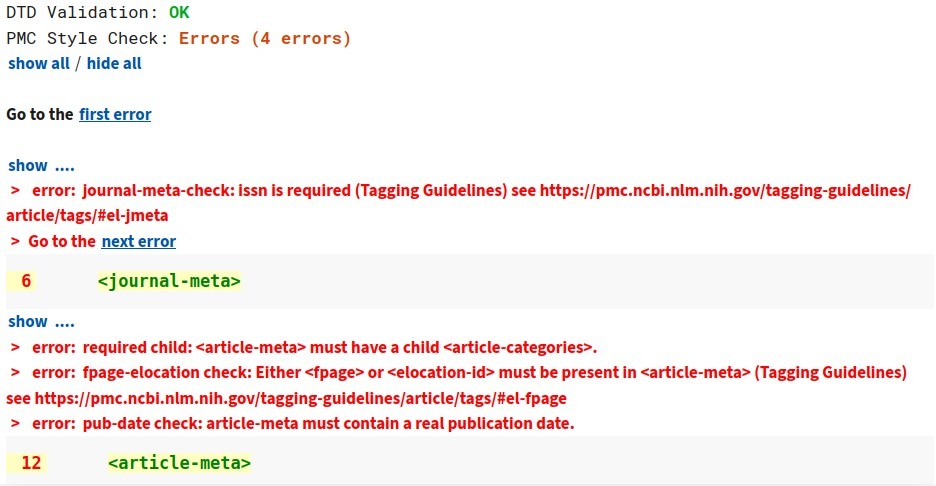
These messages tell you exactly what needs to be fixed and where.
3. Pay attention to the consistency of tag writing. #
Common errors in JATS creation are usually not related to format, but rather consistency. For example, one article writes the author’s name with <contrib>, while another article writes it directly in <author>. Small differences like this can cause data to fail to be read by the indexer.
Example of Inconsistent Tagging (AVOID THIS):
Article 1:
<contrib-group> |
Article 2:
<author>John Smith</author> <!-- WRONG: not standard JATS --> |
Article 3:
<contrib-group> |
Correct Consistent Approach (USE THIS):
All articles should use the same structure:
<contrib-group> |
Always use the same tags and structure between articles. If one article uses <sec> for subheadings, do not suddenly change it to <title> in the next article.
Consistency is key so that viewers and indexing engines can read all articles using the same pattern.
4. Use Tools that Meet Standards #
One of the best solutions is to use JATS Editor, a JATS XML creation tool that complies with DTD and JATS4R standards. In addition to complying with DTD and JATS4R standards, JATS Editor has also been validated by PubMed and EBSCO Indexing.
With JATS Editor, you do not need to write XML tags one by one. Simply fill in the article data through an interface similar to a form, starting from the title, author name, affiliation, abstract, and bibliography.
The system will automatically convert all that information into a valid XML file that is ready to be uploaded to a journal or index.
Other advantages of JATS Editor are:
- Automatically generates valid DTD XML structures without errors.
- Automatic citation compilation significantly speeds up workflow and reduces manual editing errors.
- Integrated with ROR for Author affiliations, avoiding misleading information.
- Supports multimedia such as adding photos, videos, mathematical formulas, displaying quotes, and complex tables.
- Complies with JATS4R guidelines, so elements such as references, tables, and formulas are written in the correct format.
- Features a Better JATS Viewer, which displays XML results in an article view similar to OJS.
- Can be used directly in OJS through plugin integration without the hassle of manually configuring XML code.
By using JATS Editor, you can focus on the content of your article without having to worry about the complexities of XML writing.
5. Common Mistakes to Avoid #
Here are real examples of mistakes that frequently cause rejection by indexing systems:
Mistake 1: Missing Required Metadata
<!-- WRONG: Missing essential DOI --> |
Correct:
<article-meta> |
Mistake 2: Improperly Nested Tags
<!-- WRONG: Tags not properly closed --> |
Correct:
<p>This is a paragraph</p> |
Mistake 3: Using HTML Instead of JATS Tags
<!-- WRONG: Using HTML tags --> |
Correct:
<body> |
Conclusions #
Creating JATS XML that complies with DTD and JATS4R standards is not complicated, as long as you know how. Start by understanding the basic structure, checking files with a validator, maintaining consistency between articles, and most importantly, using tools that comply with standards such as JATS Editor.
With this approach, the JATS files you produce will be valid, well-organised, and accepted by various international indexing systems. The result is not only well-read articles, but also a more professional and credible reputation for the journal in the eyes of the academic world.


