
Convert Word to JATS XML: publishing a scholarly article involves more than proofreading and formatting. Today, journals also need structured content that can be read by publishing platforms, indexing services, online viewers, and digital archives. This is where JATS XML becomes important. For more guidance, see the JATS Editor documentation.

JATS, or Journal Article Tag Suite, provides a standardized XML structure for scholarly articles. It organizes information such as article titles, authors, abstracts, references, figures, tables, and equations in a format that machines can understand. For many journal teams, however, the process can feel highly technical. If your articles are prepared in Microsoft Word, you may be wondering how to convert Word to JATS XML without manually writing complicated XML tags. Fortunately, a visual tool such as JATS Editor can make the process much easier.
Why Convert Word to JATS XML?
Microsoft Word is convenient for writing and editing, but it does not provide the structured data required by many digital publishing workflows. A Word document may look perfectly organized to a human reader while still lacking the machine-readable structure needed by an XML-based system.
When you convert Word to JATS XML, important article elements can be organized into a standardized structure, including:
- Journal and article metadata
- Author names and affiliations
- Abstracts and keywords
- Headings and paragraphs
- Figures, captions, and tables
- Mathematical equations
- In-text citations and reference lists
- Copyright and licensing information
This structure can make articles easier to manage, display, archive, and transfer between publishing systems. It also gives journal teams a more consistent foundation for long-term digital publishing.
How to Convert Word to JATS XML with JATS Editor
JATS Editor is designed to make it easier to convert Word to JATS XML through a visual editing environment. Instead of working directly with raw tags, users can organize article content through a structured interface.
1. Import Your Word Document
The first step to convert Word to JATS XML is to prepare your article in .doc or .docx format. JATS Editor supports importing Word documents into the article body, allowing journal teams to begin with an existing manuscript rather than retyping the entire article.
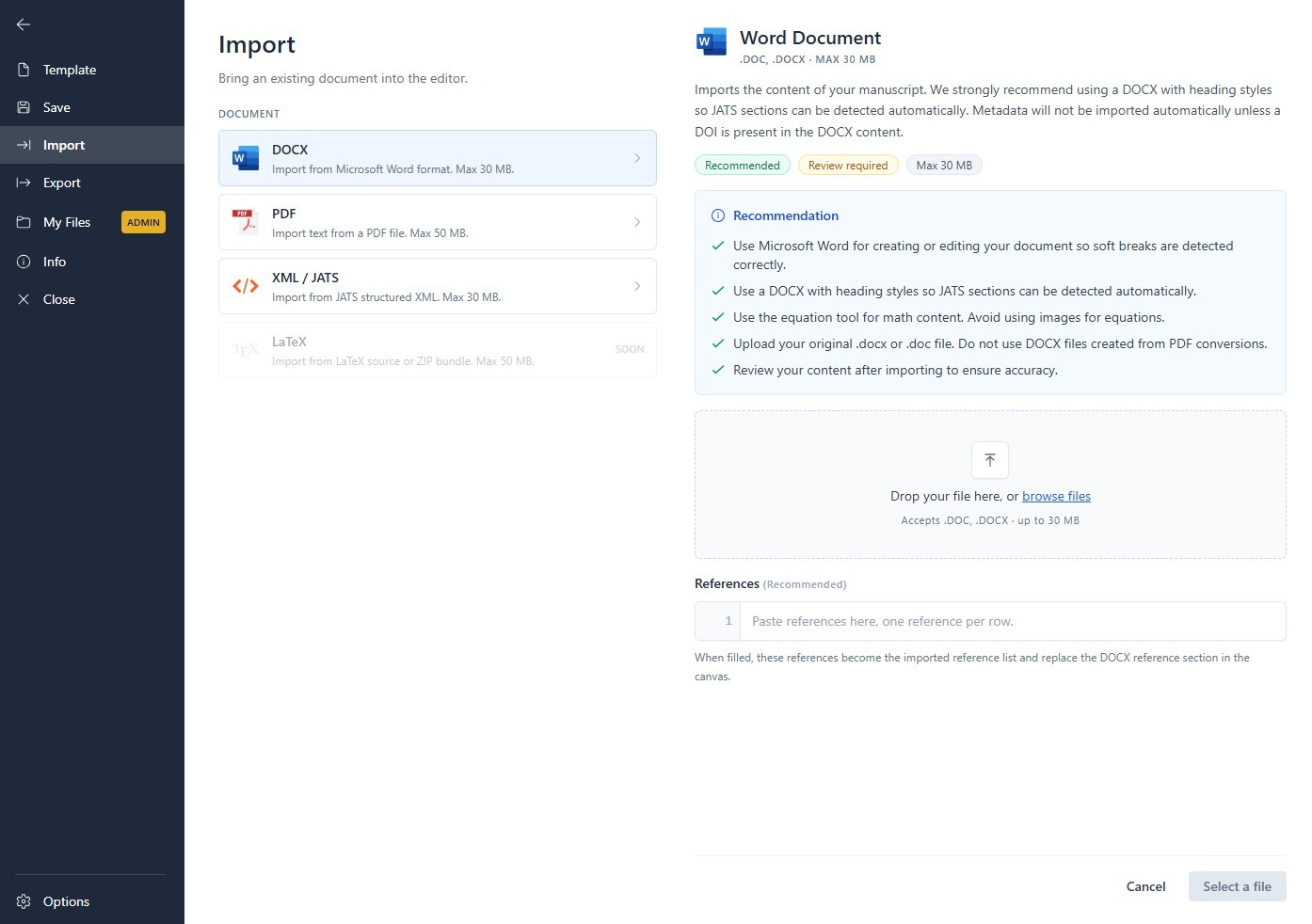
Before importing, it is helpful to use a clean document with:
- Consistent heading styles
- Clearly separated paragraphs
- Captions placed near figures and tables
- A complete reference list
- Accurate author and affiliation information
The cleaner the source document, the easier it is to review the converted structure.
2. Complete the Front, Body, and Back Sections
JATS Editor separates an article into three main areas:
- Front: Metadata such as the journal title, article title, DOI, abstract, keywords, authors, and affiliations.
- Body: The main article content, including sections, figures, tables, and equations.
- Back: References, acknowledgements, funding information, and other supporting details.
This layout follows the basic logic of a JATS article and helps users identify missing information before export.
3. Review Citations and References
References are one of the most important parts of the conversion process. A JATS file should connect in-text citations with the correct entries in the reference list.
JATS Editor provides tools for adding references and inserting citations for references, figures, tables, and other article elements. Reviewing these connections before export can help prevent incomplete or confusing article displays.
4. Check and Export the XML
Before exporting, review the validation and content checks. These checks help identify structural or content-related issues that may affect the final XML file.
JATS Editor provides export options for different publishing needs, including standard JATS/XML, web publishing for Open Journal Systems, and formats associated with PubMed and EBSCO workflows. The correct export option depends on the platform where the article will be submitted or published.
Choosing a JATS XML Conversion Service
Some journals prefer to handle XML production internally, while others need support from a JATS XML conversion service. The right choice depends on your article volume, available staff, technical experience, and publication schedule.
An external service may be useful when:
- Your team publishes a large number of articles
- You need help converting back issues
- Your staff has limited XML experience
- You require quality control before submission
- You need support for complex tables, equations, or multimedia
A visual platform can also support an internal workflow by allowing editors and production teams to make corrections directly. For journals using OJS, JATS Editor can be integrated into the publishing process so article metadata and XML production work more closely together.
Building an Efficient XML Workflow for Journal Publishing
A successful XML workflow for journal publishing should be simple, repeatable, and easy to review. A practical workflow may look like this:
- Receive the final Word manuscript.
- Check article metadata and formatting.
- Import the document into JATS Editor.
- Complete the Front, Body, and Back sections.
- Add or correct figures, tables, equations, and references.
- Run validation and content checks.
- Export the appropriate JATS XML format.
- Upload or connect the XML to the target publishing platform.
- Review the final online display.
This workflow reduces unnecessary manual tagging and creates a consistent process for every article. It can also help production teams identify errors earlier, before content reaches the final publication stage.
Start Creating Structured Articles Today
A clear way to convert Word to JATS XML does not have to be overwhelming. With the right tools and a practical process, journal teams can move from traditional manuscripts to organized, machine-readable content more efficiently.
Whether you manage XML production in-house or need to convert Word to JATS XML with a reliable JATS XML conversion service, JATS Editor can help simplify the transition from Word documents to structured journal publishing.
Ready to improve your journal production process? Explore JATS Editor today and start building a faster, more organized XML workflow for journal publishing.