
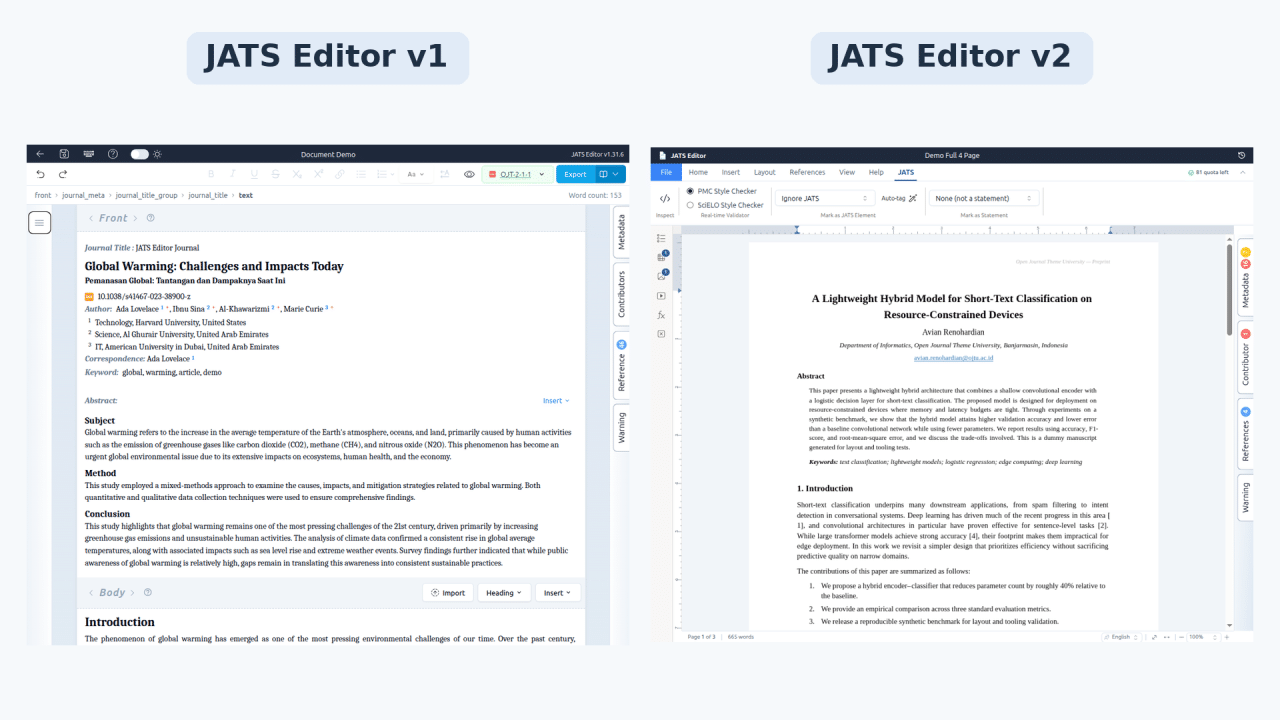
JATS Editor has grown from a tool for creating JATS XML into a full visual single-source scholarly publishing platform. You can now import from XML, DOCX, PDF, and LaTeX, then export to JATS/XML, PMC XML, SciELO XML, PDF, and DOCX, all from one document, with no XML coding required. Output is validated against the relevant schemas and structured for PMC, EBSCO, and SciELO workflows. It also includes ongoing maintenance to keep pace with evolving publishing standards, with more updates on the way.
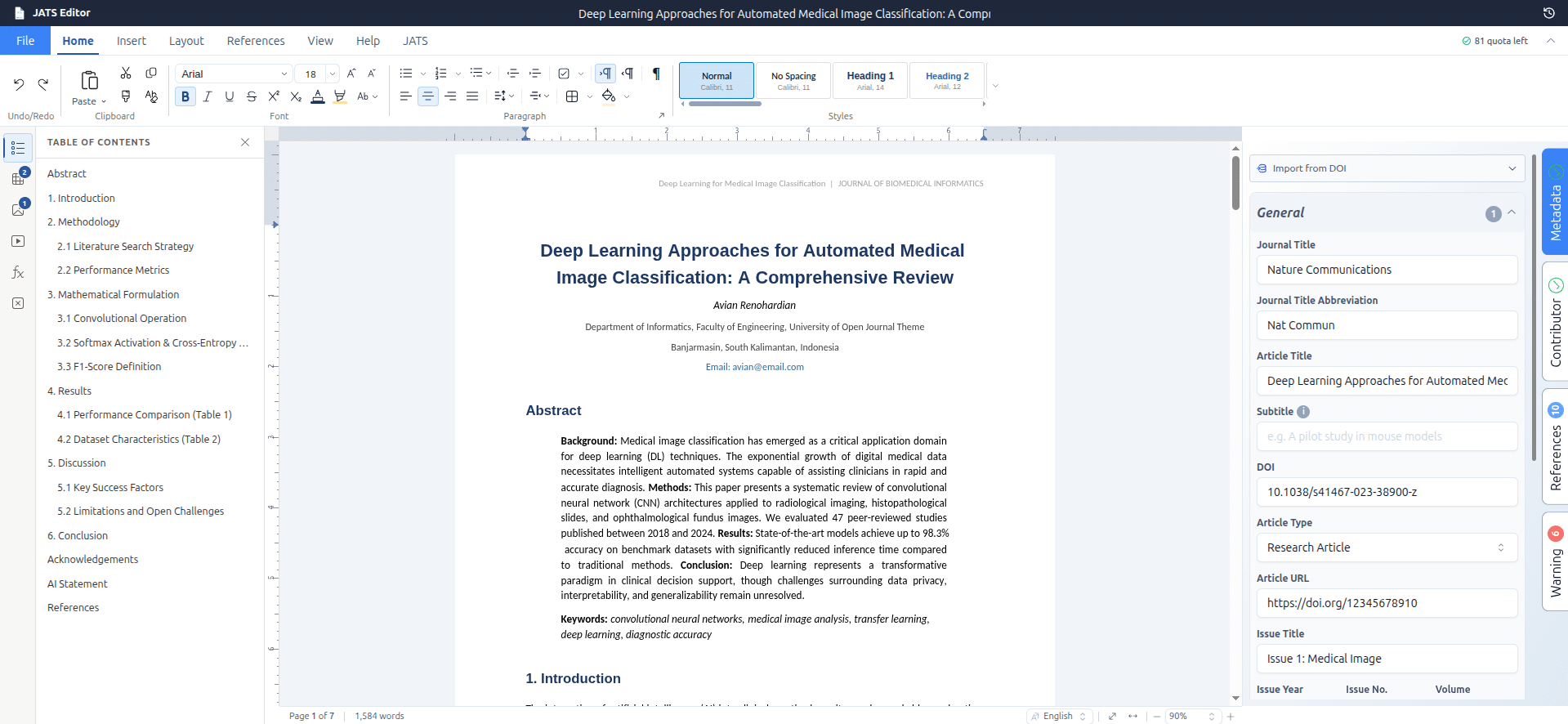
New looks in Workspace JATS Editor (v2)
From “a way to make JATS” to “a way to publish” #
When JATS Editor officially launched in January 2025, JATS Editor had one job: make creating JATS XML painless for journals, OJS users, and academic publishers who didn’t want to learn XML or pay thousands of dollars per file. That job still matters. But as we worked with more journals and publishers, it became clear that producing JATS XML is only one part of the publishing workflow.
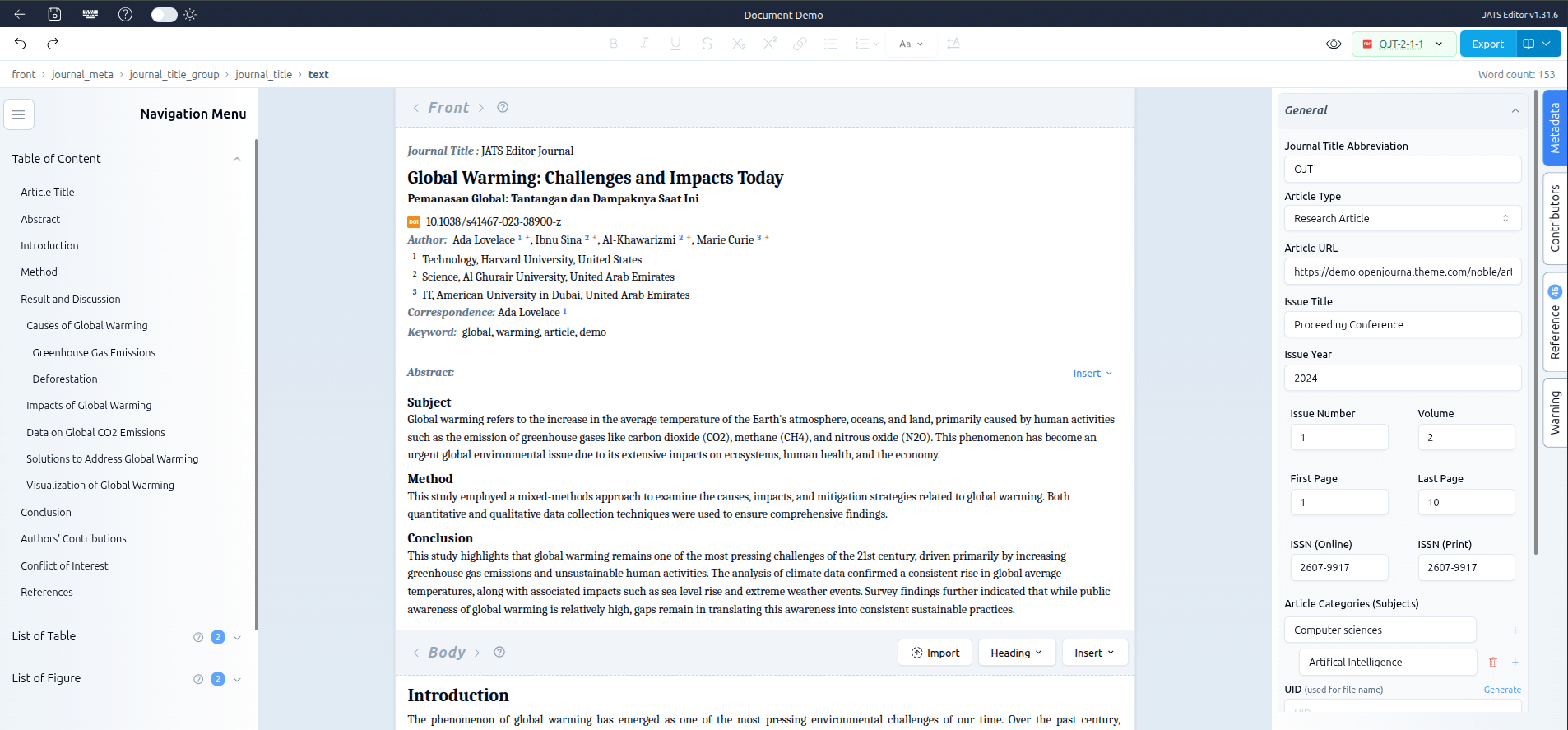
Previous looks in Workspace JATS Editor (v1)
Editors kept telling us the same thing. The JATS file is only one of the formats they need. A typical article may still be delivered as a PDF for readers, a DOCX for authors and copyeditors, and XML for indexing services such as PubMed Central, EBSCO, and SciELO. In STEM publishing, the original manuscript may also arrive as LaTeX. Producing each format separately means multiple workflows, multiple chances for versions to drift out of sync, and multiple places for errors to creep in.
So we rebuilt JATS Editor around one idea: author once, publish everywhere.
What “single-source publishing” actually means here #
Single-source publishing means there is one authoritative version of your article, and every output format is generated from it. Fix a typo, update an affiliation, or add a reference once, and the change can flow through to every output. You don’t have to reconcile a PDF against a Word document against an XML file or maintain separate versions for different publishing workflows.
Under the hood, that authoritative source is structured, semantic JATS. This gives JATS Editor an XML-first foundation while keeping the editing experience visual. You get the structure and consistency of XML without having to work directly with angle brackets.
Visual-first, but not “just a word processor” #
Most XML tools force a choice: either a Microsoft Word add-in that hides the structure (and can let formatting drift away from meaning), or a raw code editor that demands XML expertise.
JATS Editor takes a different approach. It’s visual — you see the article laid out as it will appear, edit it directly, and never touch a tag — but what you’re actually building is clean semantic structure. In publishing terms this is WYSIWYM: What You See Is What You Mean, not just what it looks like. Headings stay headings, affiliations stay affiliations, citations stay citations, so your single source is always valid and ready to convert.
Import from the document you already have #
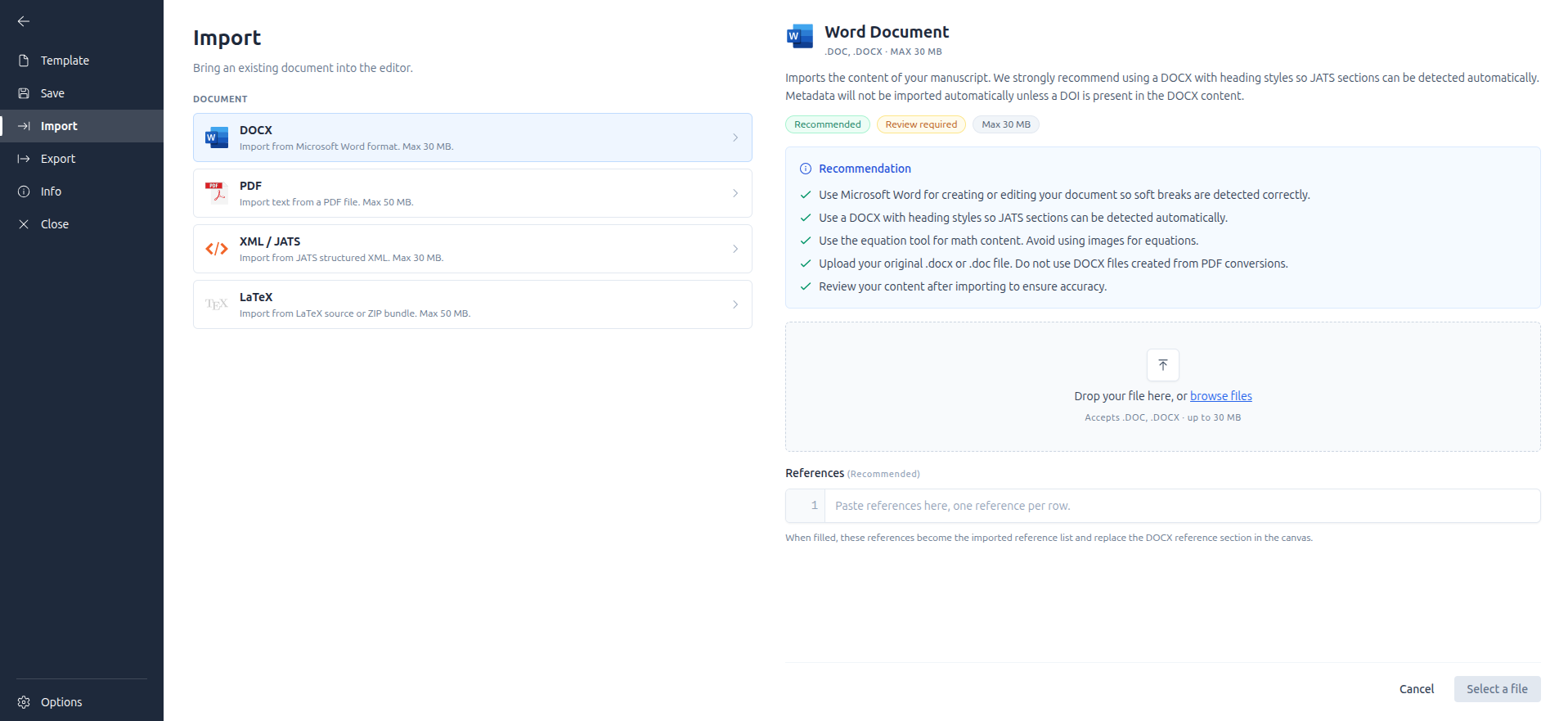
You rarely start from a blank page, so JATS Editor now meets your content where it lives:
- DOCX — bring manuscripts from Microsoft Word, LibreOffice, or Google Docs. Headings, tables, figures, and other document structures are mapped into the corresponding JATS elements.
- PDF — turn finished or legacy PDF articles into editable, structured documents. This is particularly useful for back-issue digitization and archival workflows.
- LaTeX — import .tex manuscripts or full LaTeX packages, bibliography (BibTeX) included, directly into editable JATS structure. Equations, sectioning, and citation commands are mapped into semantic elements. Coverage is strongest for standard LaTeX setups; we’re actively expanding support for journals with more specialized configurations.
- XML / JATS — import existing JATS XML to continue editing visually, correct content, or generate new outputs without starting from scratch.
AI-assisted processing runs in the background to identify metadata and map content to the appropriate JATS elements, making import a starting point rather than a manual tagging exercise.
Export to every format you need #
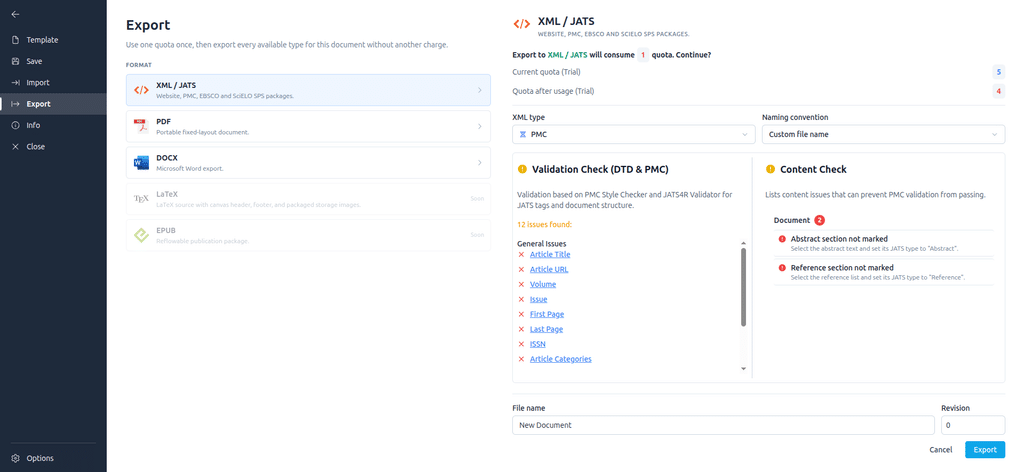
- JATS / XML — fully compliant with PMC, DTD, and major indexing requirements. Ready for PMC and EBSCO submission, with no manual reformatting.
- SciELO XML — submission-ready output following the SciELO Publishing Schema, built for journals indexed across Latin America, Spain, and South Africa.
- PDF — a clean, print- and screen-ready article.
- DOCX — a Word file for authors, reviewers, and copyeditors who live in Word.
Because these outputs are generated from the same structured source, changes made to the article don’t have to be manually reproduced across separate versions.
Actively maintained, built for evolving standards #
Publishing standards don’t stand still. PMC, EBSCO, and SciELO periodically revise their schema and indexing requirements, and LaTeX and DOCX ecosystems keep evolving too. JATS Editor is actively maintained to track these changes over time: as schemas update, we update the platform’s import and export logic to match, so the tool you’re using keeps pace with current requirements rather than falling behind.
Your existing documents are safe #
If you’re already an active JATS Editor user and have documents in the existing workspace, don’t worry: your documents will remain available in the existing workspace.
There’s nothing you need to install or migrate inside JATS Editor. When creating a new document, simply choose ‘Advanced Editor’ to start using the new workspace and its latest features and improvements. We strongly recommend using JATS Editor v2 for new documents, as it includes significant improvements to the workspace, editing experience, and publishing workflow compared with v1.
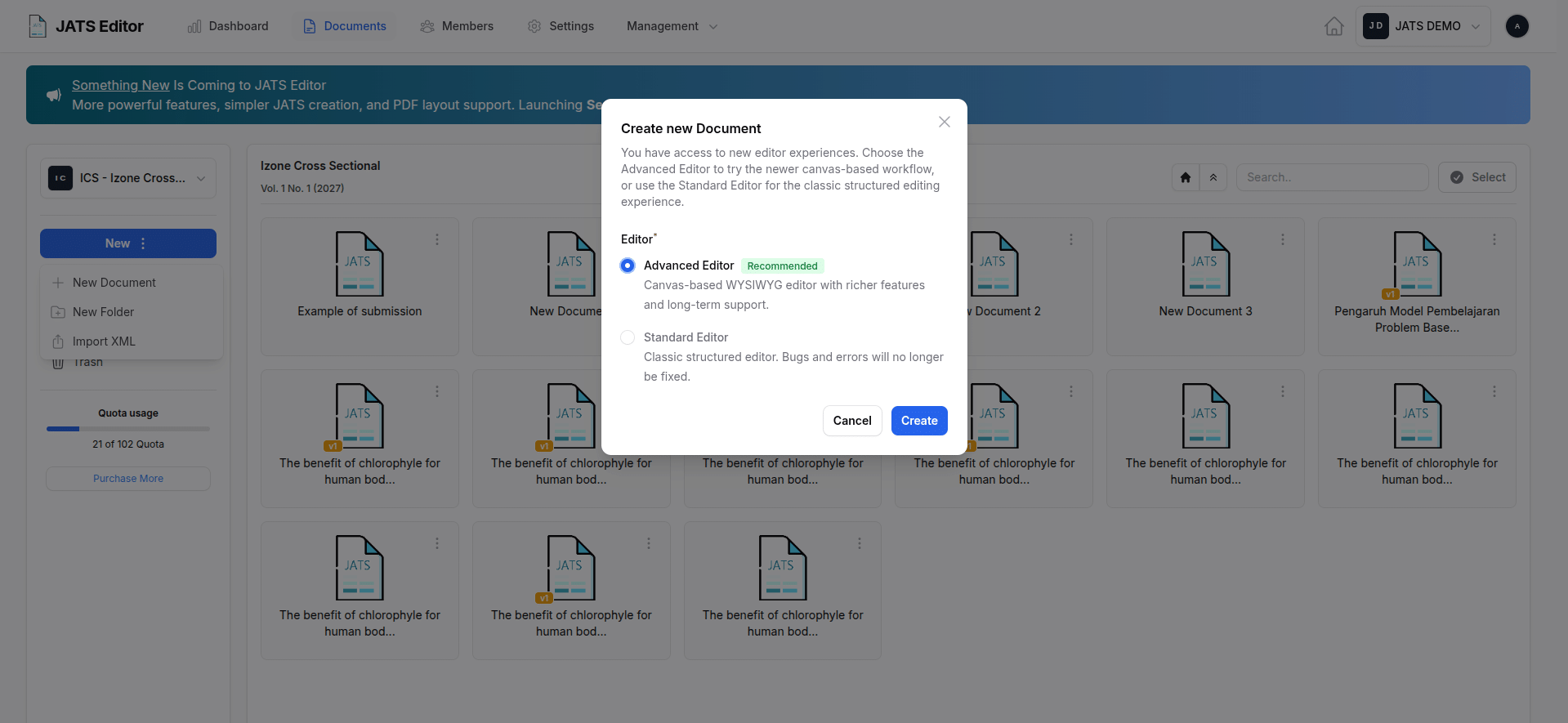
Choose ‘Advanced Editor’ to use new JATS Editor workspace
For journals using OJS, we also recommend updating the JATS Editor Plugin. The updated plugin supports the features and improvements introduced in the new JATS Editor v2 and provides better integration between OJS and the new workspace.
Your existing v1 documents don’t need to be recreated or moved. They will remain in the existing workspace, while new documents can be created directly in v2.
What’s next on the roadmap #
- EPUB export — reflowable, accessible e-reader output for your articles.
- Real-time collaboration — co-edit an article with your team, the way you already do in modern document tools.
- Multilanguage XML support: structured, standards-compliant handling of multilingual articles, including translated titles, abstracts, keywords, and full-text versions within a single JATS source, for journals publishing in more than one language.
Who this is for #
- Journal editors and managers who need PMC-, EBSCO-, and SciELO-submission-ready XML plus author-friendly PDFs and Word files, without juggling three or four separate tools.
- OJS-based journals that want one-click import and indexable galleys.
- Small and mid-sized publishers that want enterprise-grade, single-source output without enterprise pricing or a Microsoft Word dependency.


